
Power box
The G1’s mains sockets are on the power box, located under the panel box on the right side of the printer (not on the rear panel). They are labelled Forced, Feeding, and Bed. Each one has a specific function — they are not interchangeable. Connecting an appliance to the wrong socket is the source of a few common first-boot issues.
Layout
Section titled “Layout”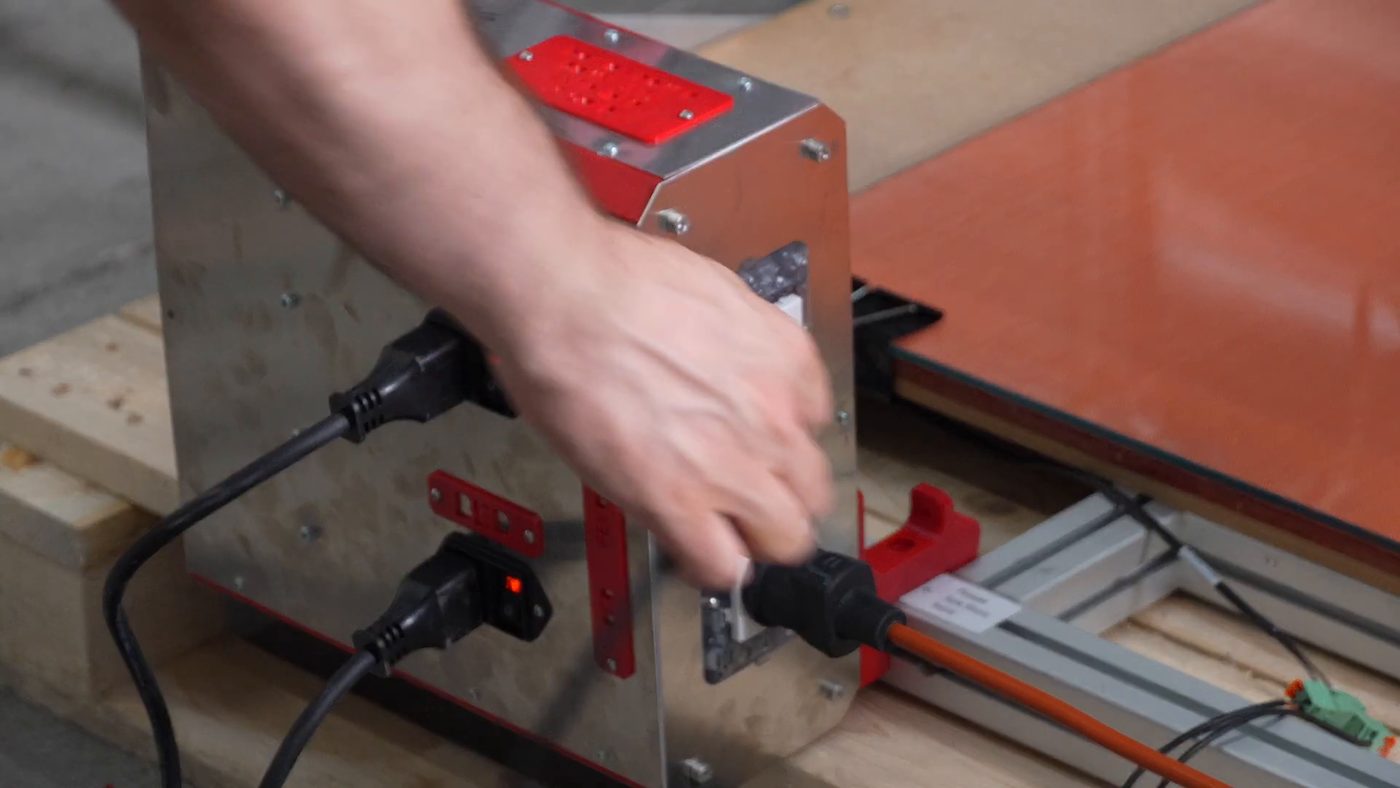
From How the G1 Automatic Feeding System works — 2:21, “plug the vacuum in the correct plug”
The three sockets are labelled on the box. Read the label rather than counting positions:
  Forced    ← Always-on, low-consumption accessories only
  Feeding   ← Vacuum pump (feeding system)
  Bed       ← Bed heater
Assignment
Section titled “Assignment”| Socket label | Function | Notes |
|---|---|---|
| Forced | Always-on / free | For low-consumption accessories only: charging a laptop, powering a camera, etc. Do not connect high-consumption loads here (and never the bed heater) |
| Feeding | Vacuum pump | Switched by the feeding logic — turns on when the printer needs to suck pellets |
| Bed | Bed heater | Switched by the firmware thermal control — turns on/off based on target temperature |
Why the distinction matters
Section titled “Why the distinction matters”Two of the three are switched by a relay, and one is not:
- The Bed socket’s relay is driven by the bed’s watermark controller — the bed is live only while the controller is calling for heat
- The Feeding socket’s relay is driven by the capacitive level sensor — the vacuum runs only when the hopper needs pellets
- The Forced socket has no relay. It is permanently live, for a laptop charger or a third-party camera — something that draws little
How the Feeding socket is actually switched
Section titled “How the Feeding socket is actually switched”Two things have to agree before the vacuum runs, which is why it cycles on and off by itself during a print rather than running continuously.
Klipper arms it. Starting a print enables the feeder, and the firmware holds
a pin high for as long as the feeding system is meant to be available
(_FEEDER_STATUS, on the extruder board). Ending or cancelling a print drops it.
The capacitive sensor switches it. With the feeder armed, the level probe in the hopper decides when the vacuum actually pulls, through a debouncer that reads its state — hardware, outside Klipper. The timing of that cycle, and the board it runs on, belong to Automatic feeding system; this page only owns the socket.
So the socket follows the hopper, and Klipper decides whether the hopper is allowed to ask. If the vacuum never runs, that is two different faults: the feeder was never armed (no print running, or the toggle is off), or the probe side is not reporting — see Hopper suction problems.
That difference decides what a Klipper shutdown does. Bed and Feeding go dead with their relays. Forced stays live. Anything plugged into Forced keeps running with the printer stopped, which is why the bed heater must never go there — see Bed heater on wrong outlet.
Powering the power box
Section titled “Powering the power box”The power box itself is fed by two main switches — “main” and “bed” — which can be wired to two separate mains lines/circuits. This splits the printer load from the bed-heater load. See Power supply 24V.
The two power box connectors
Section titled “The two power box connectors”Everything the power box switches arrives through two connectors, and they are not on the box itself. Go round the back of the power box: the two connectors land on a small Ginger board mounted behind it (assembly step 4.3, Power box wiring — “TOT 2x connectors”, 10 min, 2 operators).
Both are pluggable screw terminals, and both are labelled on the board and on the cable, so there is no guessing which is which:
| Board label | Cable label | Carries |
|---|---|---|
| [1] POWER | (1) CF_POW | mains into the box |
| [2] SSR FEED / SSR BED | (2) CF_SSR | the switching signals for the two relays |
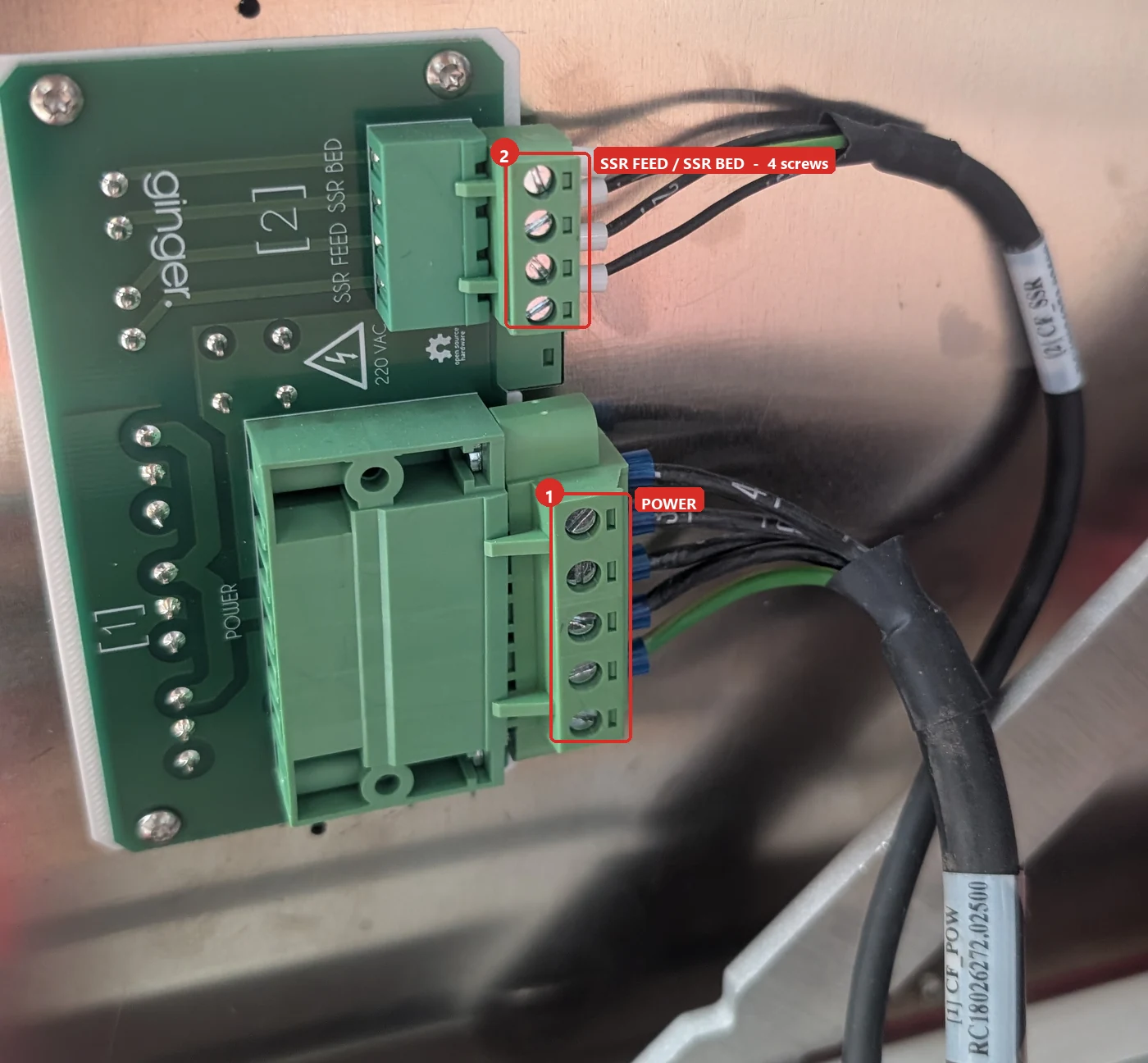
Connector [2] carries four screws, and they are two separate pairs: two for the SSR BED signal and two for the SSR FEED signal. One relay per pair.
Common first-boot mistake
Section titled “Common first-boot mistake”The most frequent wiring error on a freshly delivered machine is the bed heater plugged into the Forced (always-on) socket instead of the Bed socket. See Bed heater on wrong outlet for the fix.
Related notes
Section titled “Related notes”- Power supply 24V — the power box also houses the 24V PSU
- Bed heater
- Vacuum pump
- Bed heater on wrong outlet
- Electrical connections and first boot