
Main extruder motor
The main extruder stepper motor drives the pellet screw inside the barrel, compressing and feeding material from the hopper down through the three heating zones to the nozzle.
Specifications
Section titled “Specifications”| Parameter | Value |
|---|---|
| Type | Hanpose NEMA 34 stepper motor (86 mm flange) |
| Gearbox | 5:1 reduction between motor and screw |
| Driver | DM860T stepper driver |
| Communication protocol | Step-dir (not CAN, not Modbus) |
| Operating voltage | 55V (elevated from the 24V bus by a step-up converter inside the machine) |
| Current | Set with the DIP switches on the DM860T driver — not in the Klipper config |
| Drive | Motor, gearbox and screw form a single body; the screw is held to the gearbox output by a coupler |
| Normal operating temperature | Up to 80°C on the motor body. Above 80°C is not acceptable |
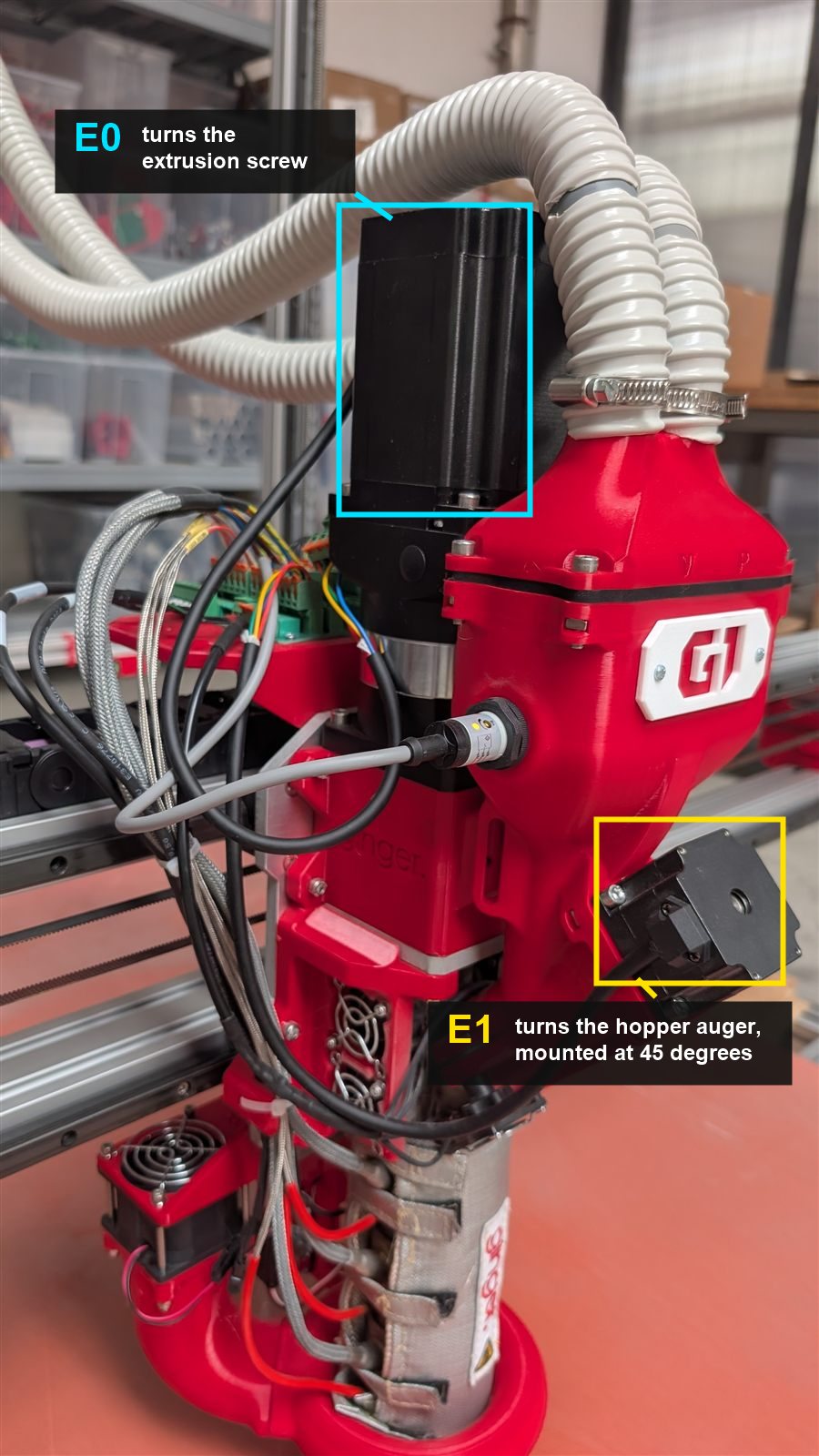
The two extruder steppers — E0 and E1
Section titled “The two extruder steppers — E0 and E1”The G1 has two steppers in the extrusion path. They appear as E0 and E1 in the firmware and in the material profile:
| E0 — main extruder | E1 — mixing stepper | |
|---|---|---|
| Motor | Hanpose NEMA 34 (86 mm flange) + 5:1 gearbox | Hanpose 57HS41, a NEMA 23 (57 mm flange) |
| Driver | DM860T, external, step-dir, 55V | TMC5160 mounted on the BigTreeTech Octopus board, driven over SPI |
| Location | Top of the extruder assembly, above the gearbox | On the hopper, part E04, mounted at 45° — it follows the angle at which material enters the extrusion screw |
| Drives | The extrusion screw inside the barrel | An auger inside the hopper |
| Job | Melts the material and pushes it out of the nozzle | Pushes pellets along the auger into the inlet of the extrusion screw |
The main extruder motor (E0) is the largest motor on the machine. Both are distinct from the XY stepper motors on the gantry.
Rotation Volume — one value per stepper
Section titled “Rotation Volume — one value per stepper”Each stepper has its own Rotation Volume, both set in the material profile.
E0 — main extruder. mm³ extruded per full screw turn. Material dependent:
| Material | Typical value |
|---|---|
| PLA | ~500 |
| PETG | ~600 — varies with the PETG grade |
E1 — mixing stepper. Sets how hard the hopper auger pushes material toward the extrusion screw:
| Value | When to use |
|---|---|
| 8000 | Standard — the default for most materials |
| 4000 | Sticky materials, and materials carrying a lot of Liquid Masterbatch — they need more push |
| 12000 | Free-flowing materials that fall easily on their own — they need less push from the mixing |
A lower number means the stepper turns more for the same commanded volume, so it pushes harder. See Rotation Volume calibration.
Normal behavior
Section titled “Normal behavior”- The motor runs continuously during extrusion
- A warm motor body is normal — the motor works under significant load — but 80°C is the ceiling, not a target
- Rotation is smooth and quiet during steady-state printing
Failure modes
Section titled “Failure modes”Motor skipping (most common)
Section titled “Motor skipping (most common)”The motor loses steps — audible as a rhythmic clicking or “tak-tak” sound.
Causes and fixes: see Extruder motor skipping.
Common triggers:
- Material too viscous (wrong temperature, wet pellets, no SmoothFlow)
- Pellet size mismatch (very large or irregular pellets don’t compress well)
- Aggregate or clog in the barrel — see Nozzle and barrel clog
- Motor current set too low on the DM860T DIP switches
Erratic behavior / no movement
Section titled “Erratic behavior / no movement”If the motor moves erratically or not at all:
- Check the motor cable connector — frayed or loose connectors cause intermittent contact (most common cause)
- Upgrade from old-style connectors to proper crimp connectors if cables show wear
- Re-seat the connector firmly at both ends
Step-up converter failure
Section titled “Step-up converter failure”The extruder motor operates at 55V, supplied by an internal 24V→55V step-up converter. If the converter fails:
- Motor shows no movement, no sound, no stepping — even when commanded
- Diagnosis: measure the step-up output with a multimeter — should read ~55V; if significantly lower or zero, the converter has failed
- Always rule out the motor connector first (see above) before suspecting the converter
- This failure has occurred in the field; contact Ginger Additive support for a replacement converter
Motor overheating (abnormal)
Section titled “Motor overheating (abnormal)”Above 80°C on the motor body is not acceptable. If the motor is too hot to hold for more than 1–2 seconds:
- The current may be set too high — check the DIP switches on the DM860T driver, not the Klipper config
- Material may be creating excessive back-pressure — check for a partial clog
Setting the motor current
Section titled “Setting the motor current”The screw is not turning — the motor is almost never the cause
Section titled “The screw is not turning — the motor is almost never the cause”No E0 stepper has ever failed in the field. If the screw does not turn, the fault is upstream of the motor. Work through these before suspecting the motor itself:
| Check | What to look for |
|---|---|
| A fried connector | Burn marks or discoloration on the motor cable connector |
| A loose connection | Re-seat the motor cable at both ends; frayed or old-style connectors cause intermittent contact |
| The step-up converter | Measure its output — it should read ~55V. See Step-up converter failure |
| The DM860T driver | A failed driver leaves the motor silent even with 55V present and the connector sound |
Only if all four check out is the motor itself in question — and at that point contact Ginger Additive support rather than replacing it speculatively.